


KnockoutJS is my personal favorite of the ever-growing assortment of MV* (Model-View) JavaScript libraries dedicated to helping developers create applications with rich client-side functionality. As I showed in a previous post, it’s relatively easy to get a simple app up and running with Knockout. However, more sophisticated solutions require a deeper understanding of how Knockout works and the various extensions and utility tools it provides.
This post offers a walk-through of a pretty common scenario that’s a bit of a step up from “Hello World”–how to create a Knockout grid with cascading dropdowns.
SETTING UP THE PROBLEM
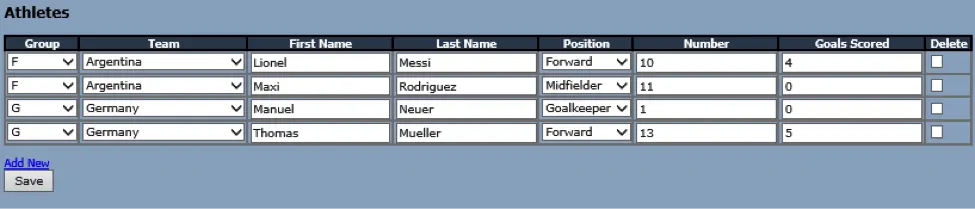
As I’m writing this on the eve of the 2014 World Cup final between Germany and Argentina, let’s say we need an app where we can manage all the athletes for each team that participated in the event. To do this, we’ll create a web page with a grid consisting of the following properties:
– Group
– Team
– First Name
– Last Name
– Position
– Number
– Goals Scored
We want our final product to look like this:
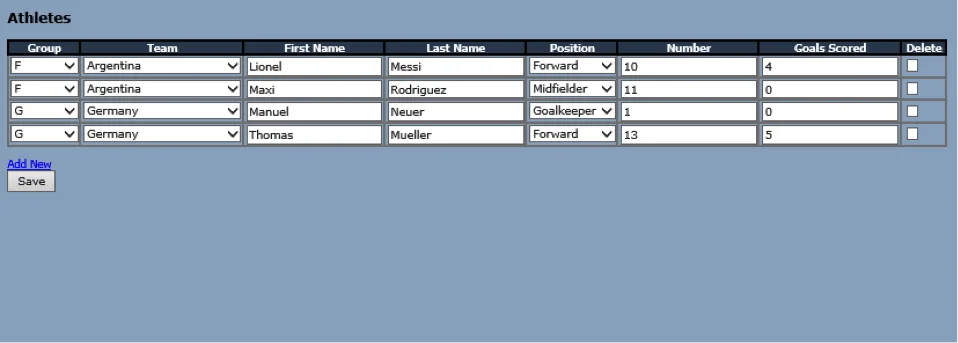

Overall, the solution is pretty straightforward. Each record should correspond to an “Athlete” class that has the appropriate Observable properties, like GroupId, TeamId, FirstName, etc. For the Group and Position dropdowns, we just need to have Observable Arrays in our main View Model that consist of the appropriate options.
The Team dropdown is a little trickier. Unlike the Group and Position dropdowns, which consist of static options, the options in the Team dropdown depend on the selected Group (each Group consists of four Teams).
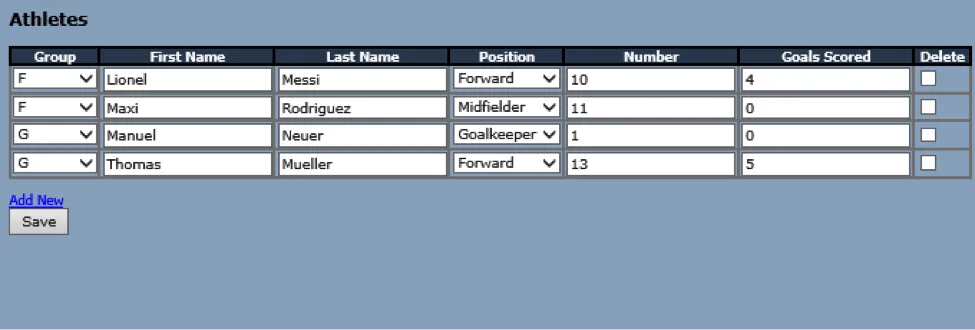
For now, let’s implement the simpler parts of the solution (without Team) and come back to that once we have everything else ready.
WRITING THE JAVASCRIPT
To start, we’ll create a SelectOption function to represent the ID and text key-value pairs for all dropdowns used on the page:
//Class to represent options for dropdown listsvar SelectOption = function (optionValue, optionText) {
  var self = this;
  self.optionValue = optionValue;
  self.optionText = optionText;};
Then, we’ll create an Athlete class used to represent each record in the grid:
//Class to represent each athletevar Athlete = function (input) {
  var self = this;
  self.AthleteId = input !== undefined ? input.AthleteId : 0;
  self.GroupId = ko.observable(input !== undefined ? input.GroupId : 0);
  self.FirstName = ko.observable(input !== undefined ? input.FirstName : '');
  self.LastName = ko.observable(input !== undefined ? input.LastName : '');
  self.PositionId = ko.observable(input !== undefined ? input.PositionId : 0);
  self.Number = ko.observable(input !== undefined ? input.Number : 0);
  self.GoalsScored = ko.observable(input !== undefined ? input.GoalsScored : 0);
  self.IsMarkedForDeletion = ko.observable(false);

  self.IsValid = ko.computed(function () {
    var valid = true;
    if (!(self.GroupId() > 0 &&
      !isNaN(parseInt(self.Number())) &&
      !isNaN(parseInt(self.GoalsScored()))
      )) {
        valid = false;
      }
    return valid;
  });};
For existing Athlete records, input will be specified and all of the properties will be initialized to the existing values. For new Athlete records, input will not be specified, and the properties will be initialized to a default value (zero or an empty string, depending on the property type).
Next, let’s create the main View Model:
//ViewModel for Athletes
athleteVM = function () {

  //Variable for the ViewModel scope (avoids confusion with 'this')
  var self = this;

  //Main Collection
  self.Athletes = ko.observableArray([]);

  //Collections for drop-downs
  self.Groups = ko.observableArray([]);
  self.Positions = ko.observableArray([]);

  //Indicates if everything in the collection is valid
  self.IsValid = ko.computed(function () {
    var valid = true;
    $.each(self.Athletes(), function () {
      if (!this.IsValid()) {
        valid = false;
      }
    });
    return valid;
  });

  //Athlete functions
  self.AddAthlete = function () {
    self.Athletes.push(new Athlete());
  };

  //Remove athlete record from array
  self.RemoveAthlete = function (athlete) {
    self.Athletes.remove(athlete);
  };

  //Loads json returned from ajax request into the observable array
  self.LoadAthletes = function (result) {
    //Reset Athletes collection
    self.Athletes([]);

    //If there is no data, result.d = "[]", so check if longer than 2
    if (result.d.length > 2) {
      var op = ko.utils.arrayMap(eval(result.d), function (item) {
        returnnew Athlete(item);
      });

      // have to use observableArray.push.apply() after emptying the array
      self.Athletes.push.apply(self.Athletes, op);
    }
  };

  //Drop-down functions
  self.LoadGroups = function (result) {
    //Reset Groups collection
    self.Groups([]);

    //If there is no data, result.d = "[]", so check if longer than 2
    if (result.d.length > 2) {
      var op = ko.utils.arrayMap(eval(result.d), function (item) {
        returnnew SelectOption(item.GroupId, item.Group);
      });

      //Add a default select option
      op.unshift(new SelectOption(0, "-Select-"));

      // have to use observableArray.push.apply() after emptying the array
      self.Groups.push.apply(self.Groups, op);
    }
  };

  self.LoadPositions = function (result) {
    //Reset Groups collection
    self.Positions([]);

    //If there is no data, result.d = "[]", so check if longer than 2
    if (result.d.length > 2) {
      var op = ko.utils.arrayMap(eval(result.d), function (item) {
        returnnew SelectOption(item.PositionId, item.Position);
      });

      //Add a default select option
      op.unshift(new SelectOption(0, "-Select-"));

      // have to use observableArray.push.apply() after emptying the array
      self.Positions.push.apply(self.Positions, op);
    }
  };

  //Ajax error function
  self.LoadError = function (x, a, t) {
    alert("error!");
  }

  //SAVE
  self.SaveChanges = function () {
    if (confirm("Are you sure?")) {
      if (self.IsValid()) {
        //CONVERT TO JSON AND SAVE
        var strData = '{"athletes": ' + ko.toJSON(self.Athletes()) + '}';
        var pagePath = window.location.pathname;
        var fn = "SaveChanges";
        $.ajax({
          type: "POST",
          url: pagePath + "/" + fn,
          contentType: "application/json; charset=utf-8",
          data: strData,
          dataType: "json",
          success: function (result) {
            alert("Your changes were saved successfully");
            PageMethod("LoadAthletes", [], vmAthlete.LoadAthletes, vmAthlete.LoadError, true);
          },
          error: function (x, a, t) {
            alert("error!");
          }
        });
      }
    }
  };};
Notice that we’re declaring an Observable Array for both the Group and Position dropdowns (although technically these don’t have to be Observable Arrays since the data won’t change), as well as an Observable Array for our main collection. We’re also declaring the functions that will be used to load JSON data into the arrays after the successful completion of an AJAX call to the server (LoadAthletes, LoadGroups, LoadPositions).
Now we only need to create an instance of our View Model, apply the Knockout bindings to the appropriate HTML element, and load our initial data:
var vmAthlete = new athleteVM();

ko.applyBindings(vmAthlete, $('#divPage')[0]);

//Load existing records on initial load
PageMethod("LoadGroups", [], vmAthlete.LoadGroups, vmAthlete.LoadError, false);
PageMethod("LoadPositions", [], vmAthlete.LoadPositions, vmAthlete.LoadError, false);
PageMethod("LoadAthletes", [], vmAthlete.LoadAthletes, vmAthlete.LoadError, false);

// Get a list of objects from a page method in code behindfunction PageMethod(fn, data, successFn, errorFn, isAsync) {
  //Set default isAsync parameter to true if undefined
  if (typeof isAsync == 'undefined') {
    isAsync = true;
  }

  var pagePath = window.location.pathname;

  // Create list of parameters in the form:
  // {"paramName1":"paramValue1","paramName2":"paramValue2"}
  var paramList = '';

  // params can be an array of parameters
  if ($.isArray(data)) {
    if (data.length > 0) {
      for (var i = 0; i < data.length; i += 2) {
        if (paramList.length > 0)
          paramList += ',';
        paramList += '"' + data[i] + '":"' + data[i + 1] + '"';
      }
    }

    paramList = '{' + paramList + '}';
  } else { // ...or, an already stringified JSON object.
    paramList = data;
  }

  // Call the page method
  $.ajax({
    type: "POST",
    async: isAsync,
    url: pagePath + "/" + fn,
    contentType: "application/json; charset=utf-8",
    data: paramList,
    dataType: "json",
    success: successFn,
    error: errorFn
  });}
IMPLEMENTING THE CASCADING DROPDOWN
Creating a static dropdown within a Knockout grid is easy (unlike Kendo UI). But how do we add cascading dropdowns to a grid? The solution does require a bit more work but is fortunately not too complicated if you take advantage of Knockout’s built-in tools.
To add the Team column, we’ll need to add a TeamId property in the Athlete class. We’ll also need an Observable Array to store the options. Unlike the other collections, however, the options in the Teams dropdown will change based on the selected Group. This means that instead of adding the Observable Array to the main View Model, we need to add it to the Athlete class:
var Athlete = function (input) {
        var self = this;

        self.AthleteId = input !== undefined ? input.AthleteId: 0;
        self.GroupId = ko.observable(input !== undefined ? input.GroupId : 0);
        self.TeamId = ko.observable(input !== undefined ? input.TeamId : 0);
        self.Teams = ko.observableArray([]);
Now we need a way to load the Teams Observable Array based on the GroupId. To do this, we’ll use Knockout’s built-in subscribe function on the GroupId Observable in order to load the appropriate Teams for that Group:
        self.TeamId = ko.observable(input !== undefined ? input.TeamId : 0);
        self.Teams = ko.observableArray([]);

        self.LoadTeams = function (result) {
            //Reset Teams collection
            self.Teams([]);
            //If there is no data, result.d = "[]", so check if longer than 2
            if (result.d.length > 2) {
                var op = ko.utils.arrayMap(eval(result.d), function (item) {
                    return new SelectOption(item.TeamId, item.Team);
                });
                //Add a default select option
                op.unshift(new SelectOption(0, "-Select-"));
                // have to use observableArray.push.apply() after emptying the array
                self.Teams.push.apply(self.Teams, op);
            }
        };

        self.GroupId.subscribe(function () {
            if (self.GroupId() > 0) {
                PageMethod("LoadTeamsByGroupId", ["groupId", self.GroupId()],
                    self.LoadTeams, function () { alert("error!"); }, false);
            }
        });
Note that in the LoadTeams function (called once the JSON is returned from the server), we’re using the ko.utils.arrayMap function to convert the JSON into an array that we can add to the Teams Observable Array. You may be tempted to just loop through the collection to add each item to the Observable Array, but that solution can severely diminish your app’s performance–the ko.utils.arrayMap function is much more efficient.
We also need a way to load the appropriate Teams when each existing Athlete record is loaded initially. To do this, we’ll define the GroupId property initially with a value of zero and then re-initialize GroupId once its subscription is in place:
        self.GroupId = ko.observable(0);
        self.TeamId = ko.observable(input !== undefined ? input.TeamId : 0);
        self.Teams = ko.observableArray([]);

        self.LoadTeams = function (result) {
            //Reset Teams collection
            self.Teams([]);
            //If there is no data, result.d = "[]", so check if longer than 2
            if (result.d.length > 2) {
                var op = ko.utils.arrayMap(eval(result.d), function (item) {
                    return new SelectOption(item.TeamId, item.Team);
                });
                //Add a default select option
                op.unshift(new SelectOption(0, "-Select-"));
                // have to use observableArray.push.apply() after emptying the array
                self.Teams.push.apply(self.Teams, op);
            }
        };

        self.GroupId.subscribe(function () {
            if (self.GroupId() > 0) {
                PageMethod("LoadTeamsByGroupId", ["groupId", self.GroupId()], self.LoadTeams, function () { alert("error!"); }, false);
            }
        });

        self.GroupId(input !== undefined ? input.GroupId : 0);
With the appropriate JavaScript in place, we only need to add the dropdown to the HTML:
GroupTeamFirst NameLast NamePositionNumberGoals ScoredDelete
Question or comments about this blog post or Knockout JS? Share your thoughts in the comment section below or send a tweet to @CrederaMSFT.
Contact Us
Let's talk!
We're ready to help turn your biggest challenges into your biggest advantages.
Searching for a new career?
View job openings

